Anomaly, warehouse and order analysis for foundries
The ERP records everything, but nobody has time to look at everything. FIP compares periods, follows the history of orders and warehouse, and points out what is out of line.
In short
FIP correlates ERP data to find anomalies and their possible causes in a foundry: stock fluctuations and period comparisons, cores loaded compared with the production programme, the full history of customer order lines (cancellations, quantity and date changes, time to settle) and customers who change plans most often. What counts as an anomaly is decided by the users, not fixed in the software.
Warehouse: movements and comparisons
FIP reads loads and unloads of the warehouse, internal and at subcontractors, and compares them between periods. It shows oscillations, unusual consumption and items whose stock is moving differently than usual.
- “How did the consumption of cores change compared with last year?”
- “Which items have stock above the usual coverage?”
- “Show me the movements of item X in the last six months.”
Cores compared with the production programme
How early are cores produced or purchased compared with when they are needed? FIP compares the production programme of a period with the warehouse loads of the cores that serve it, by item and by week. It works for internal and purchased cores and for any production cycle.
Order history and customers who change plans
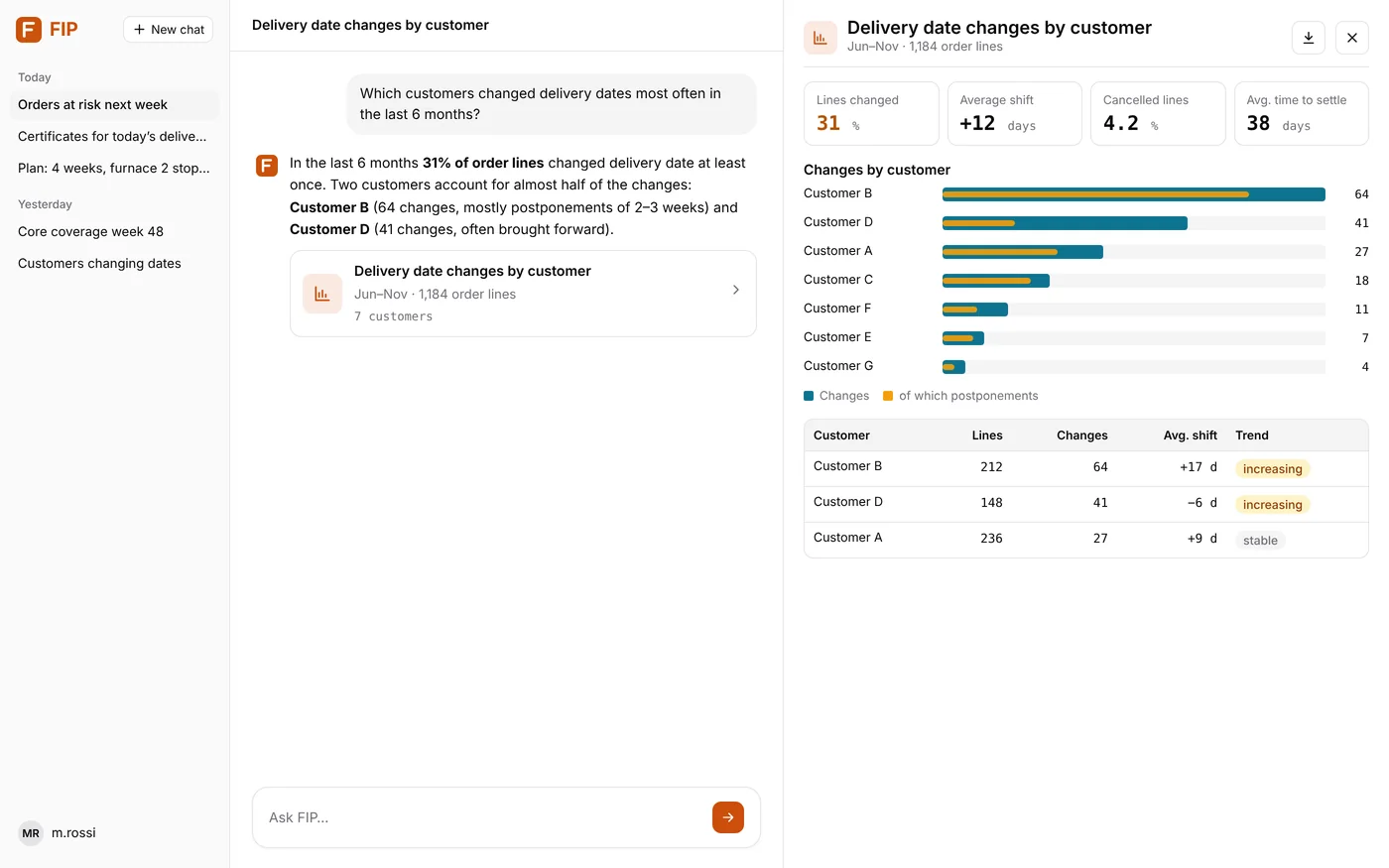
An order line changes many times: quantity, delivery date, cancellation. Many ERPs only keep the last version. FIP keeps the history of the changes and measures them.
- How many times and by how much the delivery dates of each customer change.
- Cancelled lines and quantities reduced or increased.
- Average time to fully settle an order.
- Customers whose plans are least reliable, to protect the production schedule.
You decide what is an anomaly
A 10% change can be normal for one foundry and serious for another. In FIP the thresholds are not hidden in the software: you set them by talking (“report changes above 15%”), and FIP applies them to the analysis.
Frequently asked questions
Does FIP need special data to analyse order changes?
No. FIP records the changes of order lines starting from the data the ERP already sends. From the moment it is connected, the history builds up automatically.
Can I get the analyses as a report?
Yes. Every analysis can become a PDF report sent by email, or a table to export.
Related pages
Plain-language questions
Ask about orders, production, cores, warehouse and quality in plain language. FIP answers with data, tables, charts and PDF reports, without queries.
Learn more →AI production scheduling
Foundry production scheduling with constraints in plain language: moulding, furnaces, alloys, flasks and patterns. Delays and bottlenecks explained.
Learn more →Self-learning
FIP learns from daily use: it sees which answers help, learns your foundry’s language and creates new analyses. Every improvement is verified first.
Learn more →Use cases
How production, planning, quality, sales, purchasing and management use FIP every day: concrete questions and results for each role in the foundry.
Learn more →Do you have a concrete problem in your foundry?
Tell us about it. We will solve it together with a pilot project on your data, with measurable goals.